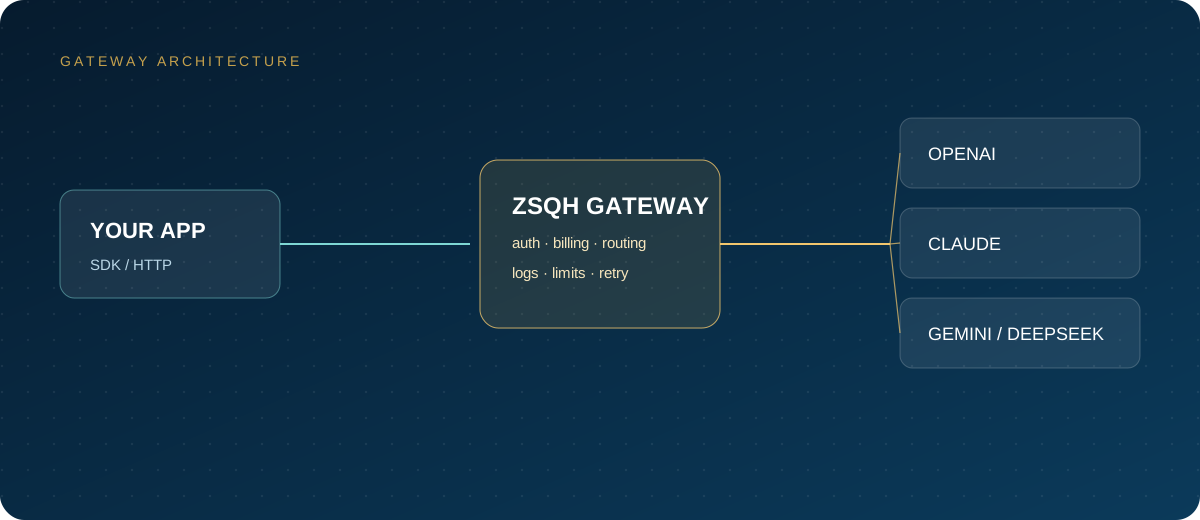
If you search for "AI relay," "API relay," or "LLM API proxy," you will see many services with different names but similar functions: they aggregate models such as OpenAI, Claude, Gemini, and DeepSeek behind a single API entry point. Developers only change the Base URL and key to call models from multiple providers.
This article explains what an AI relay actually is, who it suits, how to choose one, how to test it, and the most common pitfalls.
1. What an AI relay actually is
Simply put, it is an API gateway layer:
Your app → AI gateway (unified auth / billing / routing) → OpenAI / Claude / Gemini / DeepSeek
It typically provides:
- A unified Base URL: an OpenAI-compatible interface, so SDKs need few changes.
- A unified key: one key calls multiple models.
- Unified billing: pay by token usage and view bills in a console.
- Quotas and permissions: set limits for members, projects, and keys.
- Routing and retries: switch between multiple upstream channels.
- Usage logs: record model, tokens, latency, and errors.
For developers, the biggest value is not "cheap"; it is "less code to change, fewer accounts to manage, and controllable bills."
2. Who should use one
Good fit
- Developers in China whose access to official APIs is unstable.
- Teams that need Claude, GPT, Gemini, and DeepSeek at the same time.
- Teams that want to split AI costs by project or member.
- Teams building SaaS, agents, customer support, or content tools.
- Products that need to switch models quickly and run A/B tests.
Not necessarily a good fit
- You use one small model, your usage is tiny, and official access works fine.
- You have extremely strict data compliance requirements and must fully self-host.
- You need deep customization of upstream parameters that a gateway does not support.
3. Seven criteria for choosing an AI relay
| Criterion | What to check | Why it matters |
|---|---|---|
| Model coverage | Does it support the models and versions you need? | Determines whether it can replace direct official access |
| Stability | Error rate, timeouts, retry mechanism | Affects business availability |
| Billing transparency | Unit price, multipliers, cache, refund rules | Avoids hidden costs |
| Latency | Time to first token, concurrency capacity | Affects user experience |
| Quota management | Member, key, and project limits | Essential for teams |
| Logs and alerts | Can you inspect every call? | Troubleshooting and cost analysis |
| Compliance and data | Whether data is stored and for how long | A key point in enterprise procurement |
Do not look only at "cheap." A low price combined with frequent timeouts, rate limiting, or a provider that disappears can cost more overall.
4. How to test an AI relay
1. Run the smallest request with curl
curl "https://your-gateway.example/v1/chat/completions" \
  -H "Authorization: Bearer sk-your-key" \
  -H "Content-Type: application/json" \
  -d '{
    "model": "your-model-name",
    "messages": [{"role": "user", "content": "Reply with OK only"}]
  }'
Check three things: whether it returns, how much latency there is, and whether the response is complete.
2. Test streaming output
Streaming is a hard requirement for many products. Test time to first token and whether the stream is interrupted; do not test only non-streaming requests.
3. Test long context
Summarize a long piece of text and watch for truncation, timeouts, and abnormal cost.
4. Test concurrency
Run the same request at 5/10/20 concurrent calls and record success rate, P95 latency, and the proportion of 429 responses.
5. Test error handling
Deliberately use a wrong key, a wrong model, and empty messages, and see whether the error codes are clear. The clearer the error message, the less time troubleshooting takes.
6. Test billing
Run 20 fixed requests and check whether the tokens and charges in the console are reasonable. Do not use a service with opaque billing long term.
5. Common pitfalls
- Wrong Base URL: an extra or missing
/v1leads directly to a 404. - Mistaking a subscription for an API: ChatGPT Plus is not an API; a web membership cannot call the interface.
- Expired model names: old names stop working after upstream upgrades, so check the pricing page regularly.
- Leaked keys: keys written into front-end code, GitHub, or screenshots get abused quickly.
- No spending limits: one key in an infinite script loop can burn the balance in minutes.
- Looking only at unit price: ignoring cache, output tokens, and long context can double the actual bill.
- No backup plan: a single channel failure interrupts the business immediately.
6. How teams should manage it
- One key per person, so access can be disabled per member.
- Create keys by project for easier cost accounting.
- Set daily and monthly quotas.
- Keep production keys only in server-side environment variables.
- Review usage and error rates once a week.
- Prepare backup models and backup channels for critical workloads.
7. AI relay vs. API gateway vs. aggregation platform
Many providers use these three terms interchangeably. Roughly:
- API gateway: emphasizes a unified entry point, authentication, rate limiting, and routing; infrastructure-oriented.
- AI relay: emphasizes access from China and multi-model forwarding; convenience-oriented.
- Aggregation platform: emphasizes many models, price comparison, and unified billing; procurement-oriented.
Real products often do all three. When choosing, do not look at the name; look at the seven criteria above.
8. Where ZSQH fits
ZSQH AI Gateway provides a unified API entry point, an OpenAI-compatible interface, pay-as-you-go billing, quota management, and usage logs. It suits:
- Developers who need to connect tools such as Claude Code, Cursor, and Cline.
- Product teams that need to switch between multiple models.
- Enterprises that need unified billing and member management.
- AI applications that need stable access from China.
For specific models, prices, and integration methods, refer to model pricing and the documentation on the site.
9. A one-sentence rule for choosing
First clarify what you need: if you only call the API occasionally, choose the simplest option; if your business depends on it, prioritize stability, billing transparency, and quota management before price.
FAQ
Is an AI relay legal?
It is an API gateway or proxy service. Compliance depends on upstream authorization, data usage, and local regulations. Before enterprise use, confirm the terms of service, data handling, and invoicing or contracting.
Can the relay see my data?
That depends on the provider's architecture. For enterprise scenarios, ask clearly: whether data is stored, how long it is retained, whether it is used for training, and whether a data processing agreement can be signed.
Why are some AI relays very cheap?
It may come from promotions, shared quotas, caching, low-spec upstream channels, or hidden limits. Do not look only at unit price; test stability and billing with a small traffic share first.
Can I build one myself?
Yes. Open-source options such as New API, One API, and LiteLLM can be self-hosted, but they require servers, operations, monitoring, and upstream accounts. They suit companies with a technical team.
Next steps
If you need a unified entry point, pay-as-you-go billing, and quota management, register for the ZSQH AI Gateway, run the tests above with a small key, and then decide whether to connect production.
Related reading: