For teams in China using the Whisper API for speech transcription, the API itself is not complicated: one multipart request, one audio file, and a block of returned text. What really determines the experience is the network path — cross-border links during the day, packet loss at the evening peak, and a multi-megabyte upload that disconnects halfway can turn a simple API into an operations problem.
This article compares direct access, proxies, and gateways, focusing on large file uploads, timeouts and retries, splitting strategy, and a pre-launch verification checklist.
Note: OpenAI and Whisper are trademarks of their respective owners. This article is for technical integration only and has no affiliation, agency, or partnership relationship with OpenAI. API limits, available models, and billing rules are subject to the official and on-site documentation.
1. Three paths, three boundaries of responsibility
- Direct access: code requests
api.openai.comwithout an intermediate layer. - Proxy: a self-built VPS reverse proxy, or a third-party forwarding address.
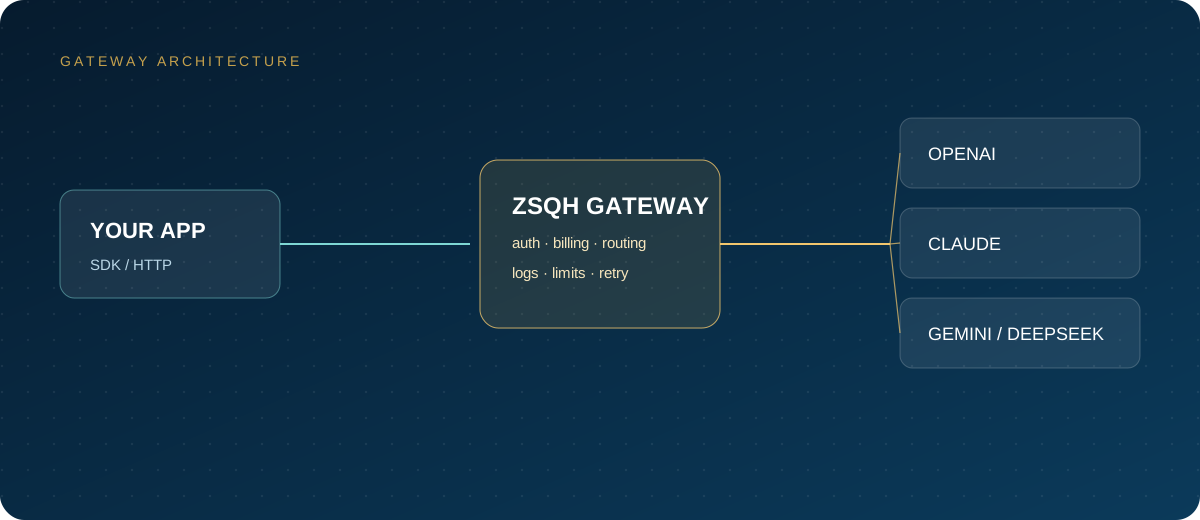
- Gateway: an OpenAI-compatible entry point such as the ZSQH AI Gateway, with unified keys, balance, billing, and invoices.
| Dimension | Direct | Self-built proxy | Gateway |
|---|---|---|---|
| Link controllability | Depends on the carrier | Relatively high | Handled by the provider |
| Stability | Fluctuates considerably | Depends on the data center and route | Usually multiple routes |
| Maintenance cost | Low | High; requires on-call attention | Low |
| Billing and invoices | USD, handled by you | Upstream bill, still handled by you | RMB, invoiced by the platform |
| Best for | Low frequency, retries acceptable | Teams with operations capability | Domestic teams and production workloads |
The core difference between the three paths is not whether they connect, but who diagnoses and who takes responsibility when something goes wrong. Think that through before comparing latency numbers.
2. Direct access: connecting is not the same as being stable
Direct access removes the middle layer, but you do not control the quality of the cross-border link. Common symptoms include:
- Normal during the day, with a rising timeout rate at the evening peak;
- Occasional slow DNS resolution and longer TLS handshakes;
- Connections reset during large uploads, with the transfer restarting from zero;
- The same code works in the office but not on a cloud server.
Do not just run a ping from a home broadband connection when testing. Run a set of real requests on the production server, record the success rate, p50 and p95 latency, and upload time, and observe for several days. For asynchronous jobs, direct access is acceptable as long as the business allows failed jobs to be rerun; for live subtitles and real-time meetings, link fluctuations become visible stutter for users.
3. Proxies: cheap servers, expensive maintenance
A self-built proxy typically means installing nginx on a VPS as a reverse proxy, then configuring a domain and certificate. It fixes the request path, but introduces new failure points:
- Insufficient egress bandwidth causes simultaneous audio uploads to queue;
- The request body size limit is not raised, so multi-megabyte files return 413;
- The proxy timeout is shorter than the transcription time, so the connection is cut while the backend is still processing;
- Expired certificates, rate-limited IPs, and upstream API changes all require manual handling.
At minimum, check client_max_body_size, proxy_read_timeout, and buffering settings. Shared proxy addresses carry additional risk: you do not know who else uses the same egress, and rate limiting or blocking may affect every user. If the key is forwarded at the proxy layer, also confirm that logs do not write authentication headers in plain text.
4. Gateways: turning a network problem into a service problem
A gateway provides an OpenAI-compatible base URL, so code usually only needs its base_url and key replaced. For domestic teams, the practical value is threefold: the provider maintains the link; text, audio, and embedding share one balance; and payment and invoicing are in RMB.
When choosing a gateway, do not stop at the phrase "supports Whisper." Confirm:
- Whether the audio transcription API is fully supported, including
response_formatand timestamps; - Per-file size, concurrency, and timeout limits;
- How failed requests are billed, and whether a request ID is provided;
- Log retention policy and deletion method;
- Whether the pricing page states the billing rules clearly.
A gateway solves connectivity and billing, not every engineering problem. Audio over the size limit still needs splitting, and network jitter still needs retries. Treat it as infrastructure with a service commitment, not an all-purpose accelerator.
5. Large uploads: why files under 25 MB still fail
The common per-file limit for the Whisper API is 25 MB; refer to the official documentation. Many people assume that a file below the limit is fine, but failures often happen during transfer.
At an uplink bandwidth of 1 Mbps, a 25 MB file alone takes about 200 seconds to transfer. Add TLS handshakes, server-side queueing, and transcription time, and it is easy to hit a proxy or client timeout. Mobile networks, cross-border routes, and shared bandwidth make this even longer.
The order for reducing failures is: compress first, split second, and only then consider retrying.
- Convert uniformly to 16 kHz mono; speech transcription does not need a high sample rate;
- Use 64 kbps mp3, where 25 MB holds roughly fifty-plus minutes of speech;
- Split audio longer than 10 minutes into 5–10 minute segments with 0.5–1 second overlap;
- Choose silence for cut points where possible to avoid splitting a word in half.
These numbers are engineering rules of thumb, not API commitments; rely on test results from your own environment.
6. Timeouts, retries, and splitting
Splitting can be done with ffmpeg:
ffmpeg -i input.mp3 -f segment -segment_time 600 \
  -ac 1 -ar 16000 -b:a 64k part_%03d.mp3
Design the retry strategy in this order:
- Retry only network errors, 408, 429, and 5xx; retrying 400, 401, or 413 is pointless;
- Use exponential backoff with random jitter, for example 1, 2, 4, 8 seconds, up to three to five attempts;
- Log the audio file name, segment number, and request ID for each request so reconciliation is possible;
- When merging, concatenate text in segment order and add the start offset back to timestamps;
- Deduplicate overlapping parts, preferring the more complete sentence;
- Limit concurrency in batch jobs to leave room for 429 recovery.
The audio API usually has no idempotency key, so after a timeout the server may already have completed the transcription and billed it. Before retrying, check the usage log, confirm that a small amount of duplicate billing is acceptable, and then decide the retry count. Cost-sensitive teams can persist failed segments separately and rerun them after manual confirmation.
7. Payment, invoices, and compliance
A common combination for domestic teams is: RMB top-up at a gateway, RMB invoices issued by the platform, and corporate bank transfer through the procurement process. Before paying, confirm that the contract entity and receiving account match, whether the invoice amount is based on the amount paid or the credited amount, and where refund and supplementary invoice rules are written. For the detailed process, see the on-site top-up documentation.
Three compliance points:
- Audio may contain names, phone numbers, medical information, and transaction details; inform users and obtain consent before uploading;
- Desensitize sensitive content first, or switch to a solution that can be deployed privately;
- Confirm whether data crosses borders, and the provider's retention and deletion mechanisms.
Ownership of transcription results depends on the audio content and platform terms. When meeting recordings, courses, and customer service calls involve other people's rights, confirm permission before commercial use.
8. Pre-launch verification checklist
- Run a ten-second audio clip and get a 200 response;
- Use five minutes of audio to confirm Chinese recognition and punctuation;
- Test upload time and timeout behavior with a file close to 25 MB;
- Simulate 429 and 5xx responses and confirm backoff works;
- Simulate a network outage and confirm retries do not loop forever;
- Verify timestamp offsets after segment merging;
- Check concurrency limits and queue length;
- Confirm balance alerts, invoicing, and reconciliation processes;
- Confirm keys exist only on the server and support rotation and revocation.
The checklist is short, but each item corresponds to a real incident. Run a week at low traffic before increasing concurrency; that is more reliable than maxing everything out at once.
Frequently asked questions
Is direct access to the Whisper API stable in China?
There is no universal answer; it depends on the carrier, time of day, and server location. Test continuously in the production environment for several days and look at the success rate and p95 latency, not a single request.
What is the difference between a gateway and a proxy?
A proxy usually only forwards traffic, while billing and operations remain upstream. A gateway generally also provides accounts, balance, key management, RMB payment, and invoices, with a more complete boundary of responsibility.
What should I do with audio over 25 MB?
First convert it to 16 kHz mono mp3 to reduce size, then split it into 5–10 minute segments. Choose silence for cut points and restore time offsets when merging.
Will retrying after a transcription timeout be billed twice?
Possibly. The server may already have completed the transcription. Check the usage log before retrying and set a retry cap.
What compliance issues matter for access from China?
The key points are personal information in audio, cross-border data transfer, provider retention policies, and content permissions. For sensitive data, prefer desensitization or private deployment.
Next steps
Verify the link with a short audio clip first, then test splitting and merging with a real long recording, and only then connect batch jobs. Teams that need RMB top-ups, a unified bill, and invoices can register for the ZSQH AI Gateway; audio models and billing rules are subject to model pricing.
Related reading: