When teams call the Whisper API, the problem is often not the model but the link: cross-border network jitter, slow uploads, timeouts on long audio requests, per-file size caps, and one key shared across projects that is hard to reconcile. A relay or proxy consolidates these headaches into a single access layer.
But a relay is not simply "a different address." Audio is sensitive data, and transcription is a long-running request. When choosing one, look at upload limits, timeouts, retries, billing, and key management. This article breaks these points down and provides an executable validation and migration checklist.
Note: OpenAI and Whisper are trademarks of their respective owners. This article is for technical discussion only and implies no affiliation with or agency for those vendors. Interface limits, error codes, and billing rules may change; the official documentation and on-site documentation govern.
1. What a relay actually relays
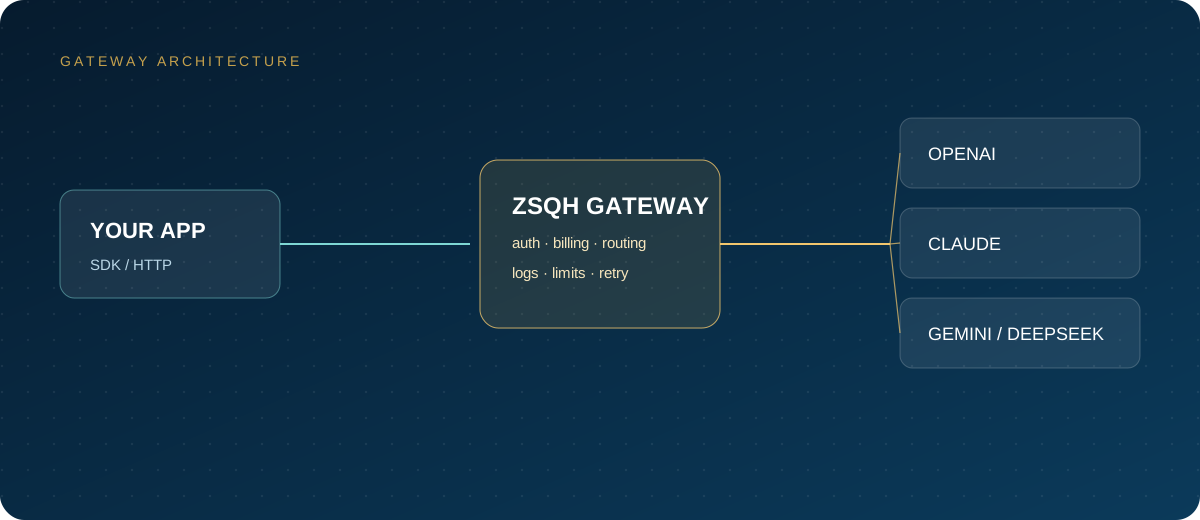
A speech relay typically does four things: forwards requests upstream, replaces or hosts the upstream key, records usage and logs, and retries or switches channels when something fails. From the business side, you still send a multipart request to /v1/audio/transcriptions; only the base URL and key change.
There are three common forms:
- Self-built reverse proxy: solves network egress only. You keep control of keys and data, but reliability is your own responsibility.
- Aggregator gateway: unifies multiple upstreams and provides quota, logs, rate limits, and fallback channels. Suitable for teams running several projects.
- Resale or top-up: a third-party account sends requests on your behalf. Prices and terms vary widely, so scrutinize data handling and compliance.
The responsibility boundaries differ. With a self-built proxy, you debug failures yourself. With an aggregator, check the provider's SLA and incident notices. With resale, confirm that the upstream terms permit this kind of use.
2. Upload limits: check all three layers
The Whisper endpoint imposes a size limit per file. The official documentation currently states 25 MB and gives no uniform duration cap. How long you can actually upload depends on the codec:
- 16 kHz mono 16-bit WAV is about 1.9 MB per minute, so 25 MB covers roughly a dozen-plus minutes.
- 32 kbps mono MP3 is about 240 KB per minute, so 25 MB can reach an hour or more.
- Relay stations, reverse proxies, and serverless platforms may set smaller request-body limits.
So when diagnosing a 413 or an upload failure, check the upstream limit, the gateway limit, and the client limit at the same time. Compressing audio is usually simpler than splitting it: transcription does not require a high sample rate, 16 kHz mono is sufficient, and MP3 or Opus substantially reduces size.
3. Chunking, transcription, and merging
Audio beyond the limit must be split. Cut at silence points where possible so a sentence is not divided in half; if that is not feasible, fixed-duration chunks also work, but keep a small overlap.
ffmpeg -i input.wav -ar 16000 -ac 1 -c:a libmp3lame -b:a 32k \
  -f segment -segment_time 600 -reset_timestamps 1 chunk_%03d.mp3
A process worth standardizing:
- Convert everything to 16 kHz mono to reduce size and format differences.
- Split into 5- to 10-minute chunks, preferring silence boundaries.
- Call the transcription endpoint chunk by chunk, passing a language hint and brief context.
- Merge the text and add a time offset based on the chunk index.
- Check the seams for duplicated or missing sentences, aligning overlapping segments if needed.
A timestamp caveat: segment-level timestamps from each chunk must have "chunk index × chunk duration" added, otherwise everything collapses back to the start after merging. With word-level timestamps, also handle words cut across chunk boundaries.
4. Timeouts and retries
Long audio transcription is not an instant request. Client read timeouts, reverse-proxy idle timeouts, and gateway upstream timeouts — any layer set too short will fail. Set timeouts for the worst case first, then control concurrency with a queue.
| Failure | Common symptom | Handling |
|---|---|---|
| 429 rate limit | Clustered failures at peak | Exponential backoff with jitter; lower concurrency |
| 5xx or gateway error | Intermittent failures | Limited retries; switch to a fallback channel |
| Read timeout | Long audio disconnects midway | Longer timeout; switch to chunked submission |
| 413 request too large | Fails immediately on upload | Compress or split; check proxy limits |
| 401/403 | Key invalid or lacks permission | Stop retrying; check key and quota |
| 400 bad parameters | Format, language, or field unsupported | Fix the request; do not retry blindly |
Retries make sense only for rate limits, timeouts, and 5xx. Retrying 4xx parameter errors merely burns quota. Log the request ID on every retry so the same audio is not billed twice; put batch jobs in a queue and route failed chunks to a dead-letter queue for human review.
5. Billing transparency
Speech transcription is often billed by audio duration, though token-based billing also exists. When comparing invoices, check whether minutes round up, the minimum billable duration, whether failed requests are charged, whether retries are double-billed, and whether there is a minimum spend.
The practice is straightforward: total the audio minutes you submitted locally and reconcile them against billed minutes; pull one day of logs and check request by request; tag failures and retries separately. If the gap persists beyond a few percentage points, ask the provider for an itemized statement. For current prices and tiers, see the pricing page; prices change, so do not budget from old screenshots.
6. Key and data risks
A relay can see your audio and transcript text. Ask before choosing: are requests and responses written to disk, for how long, are they used for training, which subprocessors are involved, in which region is data stored, and what is the deletion mechanism.
At a minimum: issue a separate key per project, set quota caps, rotate regularly, never put keys in the frontend, and avoid logging full transcript text. For customer recordings, medical, and financial content, prefer providers that can sign a data processing agreement, or switch to self-hosted transcription.
7. How to validate a relay
- Test with audio whose text you know and check the transcript against word error rate.
- Check the returned fields: model name, language, duration, and segment information should be plausible.
- Upload a file near the limit and confirm it is not silently truncated.
- Simulate long audio and observe whether timeout settings and failure messages are clear.
- Trigger a rate limit or an invalid parameter and check error-code transparency and whether billing misbehaves.
- Reconcile usage with invoices over several days to confirm consistent accounting.
Do not validate with short clips only. Long meetings, phone recordings, and noisy environments are where real-world problems concentrate.
8. Migration checklist
- Inventory existing endpoints, models, audio formats, average duration, and peak concurrency.
- Freeze a test audio set and human-proofread text as the before/after baseline.
- Confirm the relay's upload limits, timeouts, concurrency, and retry behavior.
- Make the base URL, key, and timeout configurable; avoid hardcoding.
- Add chunking, merging, timestamp offsets, and a failure queue.
- Set up invoice reconciliation and usage alerts, with a budget cap.
- Shift 10% of traffic first, watch the error rate and P95, then scale gradually.
- Keep the old channel and a rollback switch; decommission only after stability is proven.
Teams with OpenAI-compatible code usually only need to change configuration; you can start from the sign-up page and validate with a small traffic share.
9. FAQ
What is the difference between a Whisper API relay, a VPN, and a reverse proxy?
A VPN changes only the network path; a reverse proxy forwards requests; an aggregator gateway also handles keys, billing, rate limits, and retries. Different problems call for different layers.
Is the 25 MB limit set by the relay?
Not necessarily. The upstream endpoint itself has a per-file limit, and relays or proxies may set a lower cap. Confirm layer by layer; do not rely only on the client error.
How long should long-audio chunks be?
A common practice is 5 to 10 minutes per chunk, cut at silence. Too-small chunks increase request count and cost; too-large chunks risk timeouts. Let measured results decide.
Do retries cause double billing?
It depends on the provider's rules. Retrying after a success, or a timeout where the upstream has already processed the audio, can both produce duplicate charges. Deduplicate with request IDs and confirm through reconciliation.
How can I tell whether a relay switched models?
Check the returned model field, language, and segment structure, and compare transcripts against a fixed test set. If the style changes abruptly or fields go missing, ask the provider to explain.
Related reading: