An AI agent is not a single model. It is a system made of a model, tools, memory, and orchestration. When enterprises integrate an agent API, the difficult part is rarely the model itself; it is permissions, stability, cost, and controllability.
This article provides an enterprise integration checklist that covers the architecture, the boundaries to set before launch, and the controls that keep an agent useful rather than unpredictable.
Note: Agent and tool-calling protocols differ by vendor. This article uses common OpenAI-compatible tool calling as an example; refer to official or in-site documentation for specifics.
1. What an Agent API Contains
User request → Orchestrator → Model inference → Tool call → Result returned → Final answer
Core capabilities:
- Function calling and tools.
- Multi-turn conversation and state.
- Retrieval (RAG).
- External API calls.
- Timeouts, retries, and human handoff.
An agent API is therefore an orchestration contract, not just a text endpoint. The model decides which tool to use, your backend executes the real function, and the result is fed back to the model for the next step. State, memory, and the list of available tools all shape the final answer, which is why the same model can behave very differently in two applications.
2. Define Boundaries Before Integration
- Which tools may the agent call?
- Which data and systems may it access?
- Which actions require human confirmation?
- How does it degrade when a step fails?
- What is the cost ceiling?
- How long are logs retained?
Without boundaries, an agent easily becomes "uncontrollable automation." Write the answers down and review them with security and business owners before the first production request. A useful rule is to start with read-only tools, prove accuracy, and only then add tools that change data or trigger external actions.
3. Tool Calling Example
tools = [{
    "type": "function",
    "function": {
        "name": "get_order_status",
        "description": "Look up order status",
        "parameters": {
            "type": "object",
            "properties": {"order_id": {"type": "string"}},
            "required": ["order_id"],
        },
    },
}]
After the model returns a tool call, your backend executes the real function and returns the result to the model. The model never accesses the database directly. Keep each tool narrow and descriptive: a small, well-named function with a clear schema is easier for the model to use correctly than a generic "run any query" endpoint.
4. Cost Control
- Limit the maximum number of turns and tool calls.
- Use a small model for simple tasks.
- Cache repeated lookups.
- Retrieve first, then assemble long context.
- Set per-request and daily budgets.
- Watch for abnormal loops where the agent calls the same tool repeatedly.
Agent costs grow through repetition rather than through a single large request. Every turn resends context, every tool result adds tokens, and a retry can repeat both. Set hard caps in the orchestrator, not only in the prompt, and log token usage per step so you can see which stage is expensive. For internal tools with stable answers, a cache can remove a large share of calls without affecting quality.
5. Security and Permissions
- Grant tools least privilege.
- Require confirmation for sensitive actions.
- Never pass database passwords or internal tokens to the model.
- Validate tool inputs to prevent injection.
- Log every tool call: who, when, arguments, and result.
- Protect against prompt injection from external content.
Treat tool output as untrusted input. A web page, email, or document retrieved by the agent can contain instructions that try to redirect the model. Keep an allowlist of tools, validate arguments against a schema, and require a human decision for payments, deletions, permission changes, and anything else that cannot be undone.
6. Stability
- Add retries and fallbacks for tool timeouts and failures.
- Switch to a backup model when rate limited.
- Support human takeover for critical flows.
- Monitor end to end: success rate, P95 latency, tool error rate, and cost.
A successful model response is not the same as a successful task. Measure whether the agent actually completed the user's goal, and separate model errors from tool errors. When a dependency is slow, a clear timeout and a fallback path are better than letting the conversation hang.
7. When Agents Fit
- The process is fixed and tools are well defined (order lookup, reporting, approvals).
- There is a rollback or human confirmation mechanism.
- The team can absorb the cost of model and tool errors.
- Logging and audit requirements can be met.
Not suitable: high-risk, irreversible, heavily regulated scenarios without human review. Agents work best when the environment is bounded and the cost of a wrong step is low.
FAQ
Is an agent API the same as a model API?
No. A model API handles inference only. An agent also needs tools, orchestration, state, and permissions, and those pieces usually determine whether the system is reliable.
Which model should I use?
Choose by task. Use a fast model for simple tool calls and a stronger model for complex planning. Model names and prices are listed on the model pricing page.
How do I prevent an agent from calling tools at random?
Use least privilege, allowlists, parameter validation, confirmation for sensitive actions, and caps on turns and budget. Also give each tool a precise description so the model knows when not to use it.
Why does cost spiral out of control?
Common causes are multi-turn loops, long context, repeated tool calls, and retries. Add budgets at the orchestrator level and monitor usage per step.
Next Steps
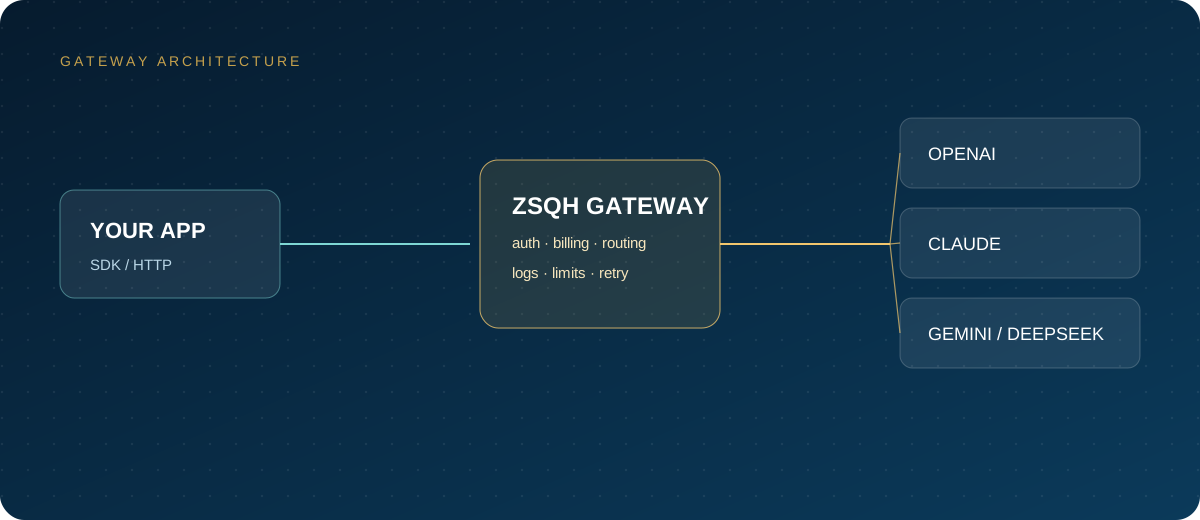
If you need a unified model endpoint, pay-as-you-go billing, and usage logs, you can register for the ZSQH AI Gateway and start a POC with a small workflow. Model names and prices are listed on the model pricing page.
Related reading: