Seedance is a video generation model from ByteDance. Unlike text models, its API uses asynchronous tasks: after submission you receive only a task ID, then you poll for status and download the video once it succeeds. For teams in mainland China, the real challenge is not just whether a request can leave the network. It also includes payment and invoicing, queue times, result storage, and failover.
This article compares three common routes: a direct official connection through Volcano Ark, a self-built reverse proxy, and a domestic AI gateway. It also covers polling, delivery, and verification.
Note: Seedance is the name of a video generation model from ByteDance's Volcano Engine, and related trademarks belong to their owners. This article is for technical explanation only and has no affiliation or cooperation relationship with ByteDance. Interfaces, models, and prices are subject to the official documentation and the on-site model pricing page.
1. Three routes in one table
| Dimension | Official direct | Self-built proxy | Domestic AI gateway |
|---|---|---|---|
| Entry point | Official Volcano Ark address | Reverse proxy you maintain | Unified OpenAI-compatible entry |
| Network | Depends on the local egress and region | Depends on the proxy server | Maintained by the provider, still affected by local network |
| Payment | Official supported top-up methods | You bear server and bandwidth costs first | On-site top-up with rules on the page |
| Invoice | Requested under official rules | Handled by you | Subject to the provider's invoicing rules |
| Model range | Seedance models open on the official platform | Determined by proxy configuration | Depends on activation; may include multiple video vendors |
| Operational cost | Low | High | Medium |
| Suitable team | Single model, able to complete the official process | Has network operations capability | Multiple models, wants one bill |
No single route suits everyone. Decide in this order: whether the business can tolerate interruptions, whether multiple models and invoices are needed, and whether anyone on the team will maintain the proxy long term.
2. Official direct: get one async task working first
The Volcano Ark video generation interface is usually two steps: create a task, then query it. The base URL looks like https://ark.cn-beijing.volces.com/api/v3. Actual available regions, model IDs, and fields are subject to the console and documentation.
- Enable the video generation model in the Volcano Ark console and confirm account and compliance requirements.
- Create a dedicated API key named
seedance-test; do not mix it with a production key. - Copy the model ID from the console. Do not assemble version suffixes from memory.
- Submit a test task at the lowest duration and lowest resolution.
- Record the returned task ID and query its status until it reaches a terminal state.
export ARK_API_KEY="your-key"
export BASE_URL="https://ark.cn-beijing.volces.com/api/v3"

curl -X POST "$BASE_URL/contents/generations/tasks" \
  -H "Authorization: Bearer $ARK_API_KEY" \
  -H "Content-Type: application/json" \
  -d '{
    "model": "model-id-copied-from-console",
    "content": [
      {"type": "text", "text": "A city street after rain, slow camera push-in, cinematic"}
    ]
  }'
If the request times out but a task appears in the console, the task was created. Do not submit it again immediately, or you may generate two videos and be billed twice. Query by business order number first, then decide whether to retry.
3. Self-built proxy: solves egress, not queueing
A common approach is to run a reverse proxy on a server that can reach the official interface reliably. It can relieve local egress problems, but it adds new work:
- The proxy server is a single point of failure; if it goes down, every task fails together.
- You must handle TLS, authentication, access control, and logging to prevent abuse.
- Video requests are large and slow, so proxy bandwidth and connection counts easily become bottlenecks.
- An extra forwarding layer does not speed up upstream queueing; during peak periods you still wait.
- Network and compliance responsibility remain with your team.
Without a dedicated maintainer, a proxy tends to turn from a temporary workaround into long-term technical debt. It can serve as a transition, but it is not advisable as the only entry point.
4. AI gateway: entry, billing, and switching in one place
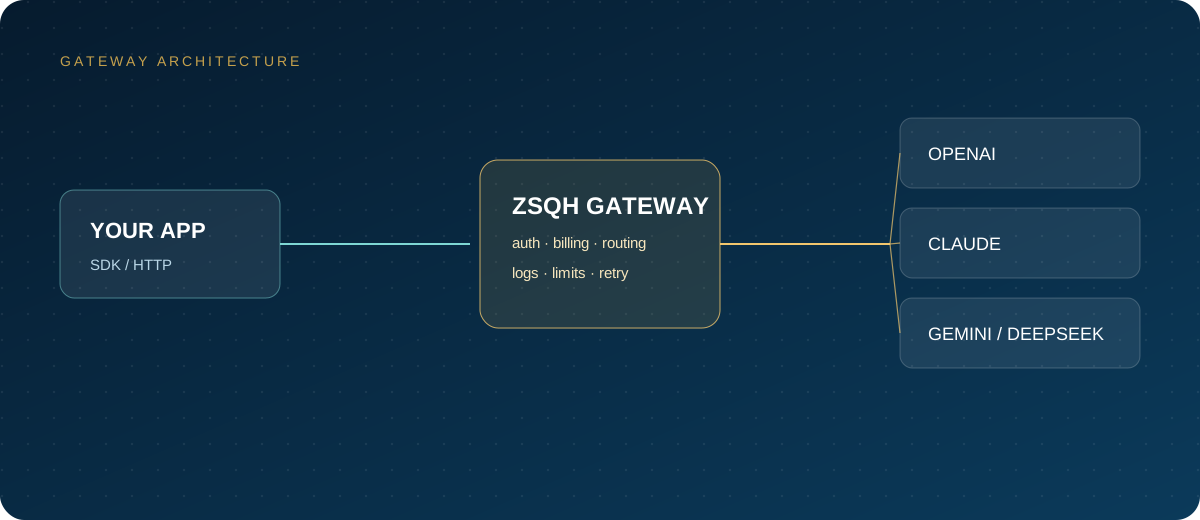
The value of a domestic AI gateway is that it centralizes key management, top-up, usage details, invoicing, and model switching. Business code knows only one entry point, and switching models becomes a configuration change rather than a code change. For teams using text, image, and video models together, this matters more than saving a few milliseconds of latency.
When choosing a gateway, confirm: whether Seedance video capability is enabled, which models and parameters are supported, how task states are mapped, how failures and cancellations are billed, how long result URLs are retained, and how outages are communicated. You can create a test key in the ZSQH AI Gateway, run a minimal task first, and then check the model pricing page and billing basis.
A gateway does not change upstream capacity. It can unify the entry point and make failures easier to handle, but it cannot promise that peak-hour queues will not occur.
5. Polling and result delivery: the real difficulty of video APIs
According to Volcano Ark documentation, task states typically include queued, running, succeeded, failed, cancelled, and expired. Task queries generally cover only the most recent 7 days, and the video_url in a successful result is usually cleaned up after 24 hours. These two facts directly shape the system design.
- Separate submission from polling; do not make one HTTP request wait synchronously for several minutes.
- Start polling at 5 seconds and back off gradually to 15–30 seconds, with an overall timeout.
- A success response may still carry an
errorobject; on failure, recorderror.codeanderror.message. - Download the
video_urlto your own object storage immediately; do not hand a temporary URL to the business for long-term use. - After downloading, verify the file size and playability, then generate your own signed URL or CDN address.
- Cancellation usually affects only queued tasks; check the documentation for exact rules.
Result delivery should be a separate step, with download, transcoding, review, and database insertion each retryable on its own. That way, when the upstream URL expires, business data is not lost with it.
6. Payment, invoicing, and contracts
- Teams that require corporate payment should confirm top-up methods, crediting time, invoice type, and invoicing cycle in advance.
- Confirm how failed, timed-out, and cancelled tasks are billed, and whether refunds or quota returns are supported.
- Request usage details by task or by key, with at least task ID, model, duration, and status.
- Read the data terms and confirm whether uploaded images, prompts, and generated results are retained or used for service improvement.
- Keep production keys out of frontends and public repositories; split by environment and set spending caps.
7. Failover: getting retries right
Retrying a video task costs more than retrying text, because each attempt is a complete generation. Recommendations:
- Generate a unique request identifier for each business order number, and check whether a task already exists before submitting.
- Retry with backoff only for 429, 5xx, and connection timeouts. Do not retry parameter errors or moderation rejections.
- Trip a circuit breaker when consecutive failures reach a threshold to prevent a retry storm.
- Prepare a backup entry or backup model, but after switching, re-check task status so two paths do not each generate a copy.
- Reconcile daily by comparing task count, success count, and billed count, and stop traffic promptly when anomalies appear.
8. Pre-launch verification checklist
- The minimal task submits successfully and a task ID is returned reliably.
- All six task states are correctly recognized and persisted.
- Polling timeout, maximum retries, and circuit-breaker thresholds are configured.
- Successful results are copied to storage within 24 hours, with a compensation job for failed downloads.
- Billing rules for failed, cancelled, and timed-out tasks are confirmed.
- Rate-limit behavior under concurrent submission has been tested, and 429 responses have backoff.
- Bills and task details reconcile line by line.
- Record success rate, P95 latency, and cost per video for seven consecutive days before scaling up.
FAQ
Can the Seedance API be called directly from mainland China?
It depends on the account, region, network, and compliance conditions. A direct official connection is one viable route, but production systems still need timeouts, retries, and a backup entry. Follow the official documentation and local regulations.
Is direct access or a gateway more stable?
There is no universal answer. Direct access removes one forwarding layer, but all failure handling is yours; a gateway unifies the entry point and billing, but adds a dependency. Test the same batch of tasks through each route and compare success rate and P95 latency, then choose based on your team's operational capability.
How long does one video take to generate?
It depends on queueing, duration, resolution, and upstream load. Anywhere from tens of seconds to several minutes is common. Production systems should set an overall timeout and expose task status to the business side.
How long are generated results retained?
According to Volcano Ark documentation, task queries usually cover the most recent 7 days, and result video URLs are usually cleaned up after 24 hours. Copy results to your own object storage as soon as possible; do not depend on temporary links.
Are failed or cancelled tasks charged?
Rules differ by platform and failure reason. Before integrating, confirm how moderation rejections, system failures, timeouts, and voluntary cancellations are billed, and rely on the billing details.
Next steps
Create a test key in the ZSQH AI Gateway, run one Seedance task at the lowest configuration, and confirm state transitions, result storage, and billing basis before choosing the production route. Models and prices are listed on the model pricing page.
Related reading: