Seedance is a video generation model from ByteDance, commonly used for ad creative, e-commerce short videos, and storyboard previews. Its API works nothing like a text model: a request does not return a video directly. You first create a task, then poll its status, and finally download the result. Teams that write code as if this were Chat Completions usually get stuck at step one.
This article follows the order of a real engineering rollout: authentication, submission, polling, parameters, testing, cost, and compliance. Endpoint addresses, model names, and billing methods change quickly, so always refer to the official and on-site documentation.
Note: Seedance, Doubao, and Volcano Engine are trademarks of their respective owners. This article is for technical discussion only. The endpoint paths and model names in the examples are for illustration; verify them in the official or on-site documentation before calling. Prices are subject to the on-site pricing page.
1. What the Seedance API is good for
- E-commerce product display videos and main-image videos;
- Feed ads and short-video creative drafts;
- Storyboards, concept films, and style tests;
- Vertical social media content;
- Preview clips for games and animation.
It is not suitable for news material that requires strict factual accuracy, human likenesses used without authorization, or legal and medical content that must follow precise brand rules. Video generation is still less controllable than live-action shooting. For important commercial work, have a human review the output before it goes live.
2. How the async task flow works
Read configuration → authenticate → submit a generation task → get task_id
        → poll status (queued / running / succeeded / failed)
        → success: download the video or fetch a temporary URL
        → failure: read the error code, then retry or abandon
Compared with text APIs, video tasks add three costs: queue time, failed retries, and result storage. Your design must account for all three. Otherwise, after launch you will see requests that time out while the task keeps running, and duplicate submissions that are billed twice.
3. Authentication and preparation
- Confirm the channel: check whether Seedance video capability is enabled on site, which models, durations, and resolutions are supported.
- Create a key: add a dedicated key in the console and name it
seedance-testorseedance-prod. - Confirm the model name: copy it from the pricing page or documentation. Do not spell version suffixes from memory.
- Confirm the callback method: some channels support webhooks, while others only support polling.
- Prepare assets: turn first-frame images and reference images into publicly accessible URLs, or upload them as the documentation requires.
- Set a budget: put a spending limit on the test key so debugging cannot produce a large bill.
Authentication is usually Authorization: Bearer <API_KEY>, but some platforms use AK/SK signing or temporary tokens. Follow the actual documentation, and do not apply one platform's authentication scheme to another.
4. Submitting a task
The following is a common task-style request shape. Paths and fields are examples only:
export SEEDANCE_API_KEY="your-key"
export BASE_URL="https://your-gateway-or-official-address"

curl -X POST "$BASE_URL/contents/generations/tasks" \
  -H "Authorization: Bearer $SEEDANCE_API_KEY" \
  -H "Content-Type: application/json" \
  -d '{
    "model": "seedance-video",
    "content": [
      {"type": "text", "text": "A Shanghai street after the rain, slow camera push-in, cinematic, 16:9"},
      {"type": "image_url", "image_url": {"url": "https://example.com/first-frame.jpg"}}
    ],
    "duration": 5,
    "ratio": "16:9",
    "resolution": "720p",
    "watermark": false
  }'
After a successful submission, the response contains a task ID. Store it in your database and bind it to your business order number. Polling, retries, and reconciliation all depend on it.
5. Polling and downloading
curl "$BASE_URL/contents/generations/tasks/$TASK_ID" \
  -H "Authorization: Bearer $SEEDANCE_API_KEY"
Typical statuses include queued, running, succeeded, and failed. Recommendations:
- Start polling at 5-second intervals and back off gradually to 15–30 seconds.
- Set an overall timeout, for example 10 minutes. Mark the task failed on timeout instead of waiting indefinitely.
- Video URLs in successful responses usually expire. Copy the file to your own object storage promptly.
- Record the error code and request parameters for failed tasks so you can review them later.
6. Key parameters
| Parameter | Purpose | Practical advice |
|---|---|---|
prompt / text |
Describes the scene, action, camera, and style | Write the subject first, then the camera and lighting |
| First-frame image | Controls the starting frame | Use a clear image with no copyright disputes |
duration |
Video length | Test with the shortest option first |
resolution |
Output resolution | Use a low setting for tests and raise it for final output |
ratio |
Aspect ratio | Choose 9:16 for vertical placements |
seed |
Random seed | Fix the seed to compare parameter changes |
watermark |
Whether to add a watermark | Confirm platform rules before commercial use |
Parameter names vary between platforms. Some use image, some use image_url, and some expect duration as a string. Follow the documentation and do not copy another provider's request body directly.
7. Pre-launch test checklist
- Does authentication pass, and is a 401 captured correctly?
- Does a task with the shortest duration and lowest resolution succeed?
- Is the task ID returned reliably, and can the task be queried by ID?
- Are the polling timeout and maximum retry count configured?
- Are failure reasons readable, and does the system distinguish moderation rejection from system errors?
- Are the result URL expiry and the copy-to-storage logic verified?
- Does billing match expectations, and are failed tasks charged?
- Does concurrent submission trigger rate limiting?
8. How to estimate cost
Video costs are usually far higher than text costs. Do not look at the unit price alone:
Cost per video =
  unit price × duration × resolution factor
+ failed retry cost
+ storage and bandwidth
+ human review time
Billing may be based on generated seconds, resolution tier, or video-token conversion. See the on-site model pricing for actual rates. Run a small batch of 20–50 videos first, measure the success rate, average duration, and cost per video, and then decide whether to scale.
9. Content review and copyright risk
- Likeness rights: uploading photos of real people or generating identifiable people requires authorization.
- Copyright: reference images, styles, music, and trademarks may all involve third-party rights.
- Content policy: violence, sexual content, illegal material, and false information will be rejected or removed.
- False advertising: ad creative must not depict results that differ from the actual product.
- Data security: uploaded images and videos may contain customer information. Redact it and define retention periods.
- Commercial use: whether generated content can be used commercially depends on the platform terms and your rights to the input assets.
Build three gates: review assets before submission, sample outputs manually after generation, and have brand or legal sign off before publishing. A moderation rejection is not a technical failure; do not repeatedly try to bypass it by swapping keywords.
10. Stability recommendations
- Persist tasks in a database, recording submission time, status, duration, and cost.
- Separate submission from polling so one request does not wait synchronously for several minutes.
- Use exponential backoff for 429 and 5xx responses, and do not blindly retry 4xx parameter errors.
- Prepare a backup channel or backup model; video channels may queue during peak periods.
- Monitor success rate, P95 latency, and cost per video, and reconcile daily.
FAQ
Does the Seedance API return a video synchronously?
Usually not. Video generation is generally an async task. You submit it, then poll or wait for a callback, and then download the result.
Can it be called directly from mainland China?
It depends on the channel, account, and compliance conditions. Confirm the terms of service, content policy, and local regulations before use.
How long does one video take?
It depends on queueing, duration, resolution, and upstream load. Anywhere from tens of seconds to several minutes is common. Production systems need timeouts and retries.
Are failed tasks billed?
Rules differ by platform. Before integrating, confirm how failures, moderation rejections, and timeout cancellations are billed.
Can I use my own image as the first frame?
Most video models support it, but the image must be accessible to the platform and you must hold the necessary rights. Check the documentation for the exact fields.
Next steps
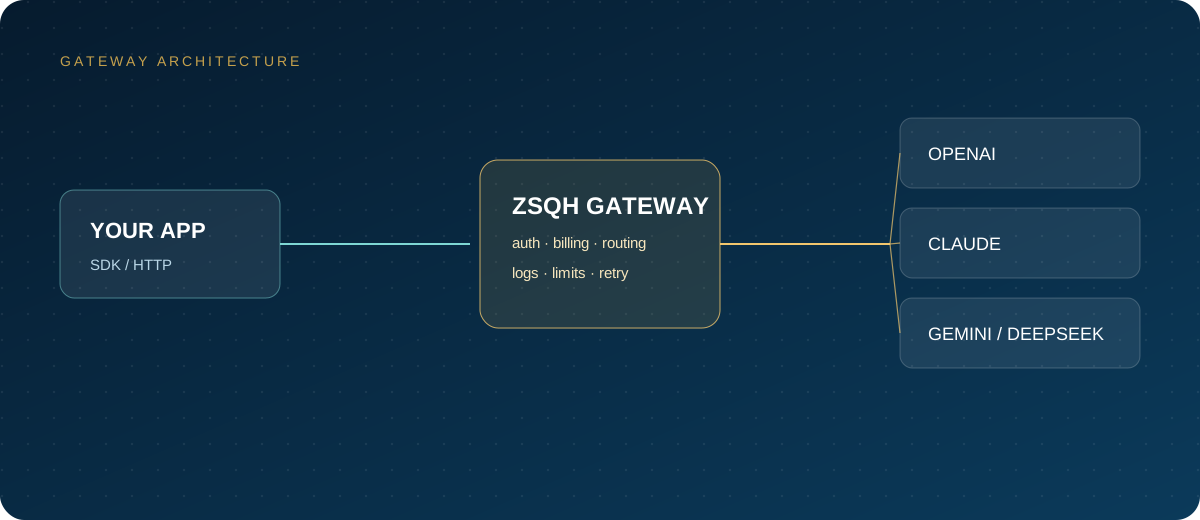
First confirm whether the Seedance channel is enabled on site, then run one task with the lowest configuration. If you need a unified entry point, create a key in the ZSQH AI Gateway and check available models on the model pricing page.
Related reading: