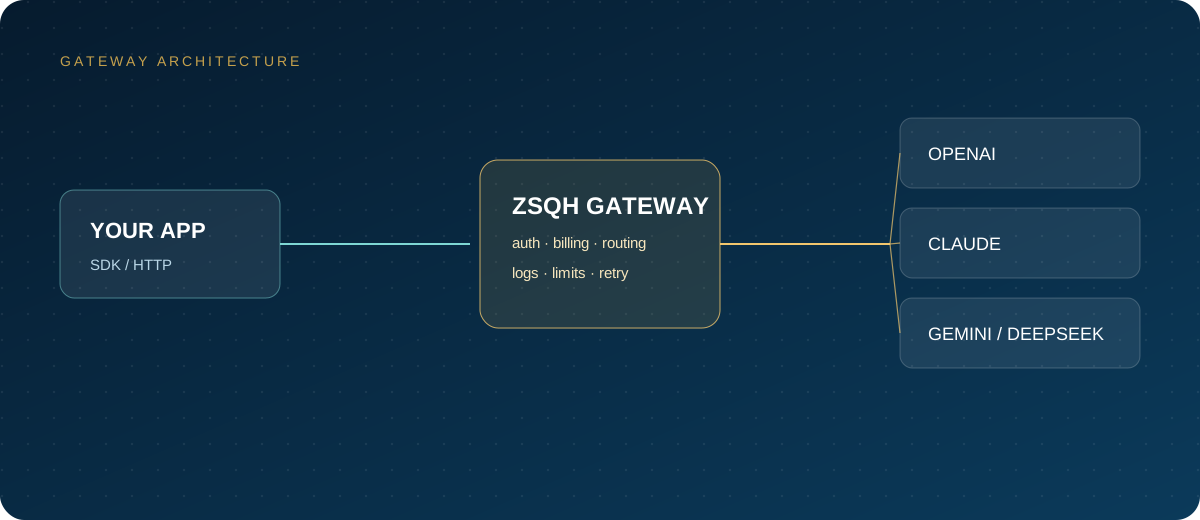
Many teams start integrating Kling through a relay or proxy: change the base URL and the key, and it looks easier than a direct connection. But video generation is asynchronous, and a relay chain adds task persistence, state mapping, callback forwarding, and result transfer on top of a text API. If any link is thin, the symptom is always the same: "the submission succeeded, but the video never arrives."
This article follows the actual relay chain and explains task reliability, result retention, billing transparency, key risk, and how to accept a relay when migrating from a direct connection.
Note: Kling is a trademark or registered trademark of Kuaishou and its affiliates. This article is a technical explanation only and implies no affiliation or partnership with Kuaishou. Interfaces, models, and billing rules follow the official documentation and the in-site model pricing; prices may change.
1. Four kinds of "relay": know what you are buying
| Type | What it actually provides | Main risk | Suitable for |
|---|---|---|---|
| Reverse proxy | Forwards requests to the upstream interface | Single point, egress bandwidth, auth configuration | Teams with operations skills that only want a unified egress |
| Aggregation gateway | One entry point aggregating several video models | State mapping, parameter differences, result transfer | Multi-model work, small teams |
| Reseller / top-up | Resells credits or pays on your behalf | Upstream stability, terms of service, balance safety | Temporary trials, small needs |
| Self-hosted gateway | You deploy and maintain the forwarding layer | Servers, certificates, abuse prevention all on you | Data control with an in-house technical team |
Whether you are buying a "technical service" or "model credits" determines who is responsible during an outage, who issues the invoice, and whose data terms you sign. Check the contract and invoices against that distinction rather than whether the page mentions Kling.
2. How task states move through a relay chain
Your application
  → Relay entry (auth, quota, billing)
  → Upstream creates the task and returns a task id
  → Relay stores the mapping between task id and business reference
  → Relay polls upstream or receives callbacks
  → Maps to unified states and exposes a query API or webhook
  → You download the result and transfer it to your own storage
The official new interface generally uses submitted, processing, succeeded, and failed; the older interface may report success as succeed. If a relay maps only success and failure, the business side may wait on processing forever. If upstream tasks can expire, the relay also needs an exit such as expired.
Every additional hop is another place where state can be lost: an in-memory mapping disappears when the relay restarts; a task is created upstream but the relay returns a failure, so the caller retries and generates two copies; a callback has no idempotency key, so the business side inserts duplicates. When evaluating, ask: where is the task ID stored, for how long, can it be looked up by business reference, and how are failures compensated?
3. Result retention and transfer
The official documentation states that generated result URLs are cleaned up after 30 days and use an anti-hotlinking format. Relays commonly handle this in three ways, with very different responsibilities:
- Pass through the upstream URL: the caller bears the responsibility of transferring the result within 30 days.
- Cache or proxy the URL: whether it re-fetches after expiry, how long it caches, and whether it charges extra must all be documented.
- Managed transfer: the relay downloads and stores results long term; confirm the storage location, access permissions, deletion mechanism, and retention period.
A "permanent link" sounds convenient, but if the relay merely points its own domain at an upstream URL that expires, it will fail after expiry too. During acceptance, access the link once 24 hours after success and again close to the 30-day mark to confirm it still works.
4. How to check billing transparency
Kling video is usually billed by a combination of seconds, resolution, audio, and motion control, and may also use resource packs and concurrency slots. A relay may add a markup, set a minimum spend, or change the validity period of resource packs, so a promotional discount on its own tells you little.
For reconciliation, require at least: task ID, business reference, model, duration, resolution, status, amount charged, and currency. The billing field in official callbacks distinguishes cash from resource-pack deductions and provides the amount, currency, and package type. Whether a relay passes these fields through unchanged is a direct indicator of transparency.
Also confirm whether failures, timeouts, cancellations, and moderation rejections are billed, whether duplicate submissions are deduplicated idempotently, and how refunds and invoices are handled. Specific prices follow the in-site model pricing. Before signing, run 20 to 50 small tasks for a week and reconcile the success count, failure count, and invoice line by line.
5. Keys, data, and upstream risk
When requests pass through a third party, prompts, first-frame images, and generated videos may be viewed or written to disk. Before purchasing, confirm:
- Whether a key can be limited by quota, IP, and validity period, and whether it can be revoked quickly after a leak.
- Whether requests and results are persisted, for how long, where, and who can access them.
- Whether data is used for training or service improvement, and whether a data processing agreement can be signed.
- Whether upstream is a single channel or multiple channels, and how model retirement or version changes are announced.
- Whether the terms of service permit resale or proxying, and where responsibility lies in a dispute.
- Who signs callbacks, how long the timestamp window is, and how replayed requests are rejected.
Never put production keys in front-end code, repositories, or screenshots in tickets. For highly sensitive material, prefer providers that support no-persistence processing or are willing to sign an agreement; when that cannot be confirmed, redact before uploading. A Kling key is often shown in full only once in the console, so create a new one rather than guessing if it is lost.
6. Steps for migrating from direct connection to a relay
- Inventory existing calls: models, parameters, concurrency, average duration, and failure types.
- Build an interface mapping table: domains, authentication, fields, state values, and error codes.
- Exercise all four paths in a test environment: create, query, callback, and download.
- Run shadow traffic with the same task set through both direct and relay, comparing only, not switching.
- Compare success rate, P95 latency, result download rate, and cost per successful video.
- Shift 5% to 20% of traffic gradually, keeping a direct-connection fallback switch.
- Observe for 3 to 7 days and confirm that invoices, task details, and business references reconcile.
- After full cutover, keep dual-channel fallback for a while, then simplify the architecture once stable.
During migration, do not delete the direct-connection key, and do not write both task sets under the same business reference, or reconciliation becomes impossible.
7. How to verify a relay
# 1. Submit a minimal task and record the task id, business reference, and submit time
curl -X POST "$RELAY_BASE_URL/text-to-video/kling-2.6" \
  -H "Authorization: Bearer $RELAY_API_KEY" \
  -H "Content-Type: application/json" \
  -d '{
    "prompt": "A cat yawning by the window",
    "settings": {"duration": 5, "resolution": "720p", "aspect_ratio": "16:9"},
    "options": {"external_task_id": "relay-test-20261019-01"}
  }'

# 2. Query every 10 seconds and record the full state transitions and error messages
curl "$RELAY_BASE_URL/tasks?task_ids=$TASK_ID" \
  -H "Authorization: Bearer $RELAY_API_KEY"
Deliberately create exceptions during testing: cancel immediately after submission, pass a wrong model ID, exceed the concurrency limit, interrupt a download midway, and send a callback twice. Observe whether the returned states, error codes, and charges are consistent. Access the result URL after 24 hours, query the task record after 7 days, and near the 30-day mark confirm once more that the link and record still exist.
8. Monitoring and rollback after migration
- Count tasks by state, focusing on the share of
failed,cancelled, and expired tasks. - Record total time from submission to success, splitting queue time from generation time.
- Monitor the result download success rate; failed tasks should enter a compensation queue rather than retry indefinitely.
- Count 401, 404, 429, and 5xx responses, distinguishing key, model, concurrency, and upstream faults.
- Calculate cost per successful video rather than only the price per request.
- Set a rollback threshold, for example switching back to direct connection when the success rate is clearly below baseline for two consecutive hours.
FAQ
Are videos from a relay the same as from a direct connection?
It depends on whether the relay forwards the same upstream model and parameters. Model versions, duration, resolution, and audio capability may differ. Before integrating, run several clips through both with the same prompt and parameters and compare.
Will a relay store my videos?
It varies by provider. Ask whether results are persisted, for how long, where, who can access them, and how deletion works. When customer material is involved, prefer providers with clear terms.
What if a task is lost on the relay side?
Check your local records by business reference, then check the relay logs and the upstream task. If it cannot be recovered, you can only resubmit. Before migrating, confirm whether the relay persists task mappings and supports lookup by business reference.
What if the invoice does not match the task count?
Common causes include duplicate submissions, retries after failure, different cancellation rules, minimum spend, and expired resource packs. Require a per-task-ID billing breakdown and reconcile line by line rather than checking only the total.
How much code does migration require?
If the relay is compatible with the official task interface, usually only the domain, key, and a few fields change. If state mapping or callback formats differ, the polling and persistence logic must change too. A shadow run reveals most differences in advance.
Next steps
Create a test key at the ZSQH AI Gateway and validate the four paths of creation, polling, callbacks, and billing with a minimal task, then migrate gradually. Models and prices follow the model pricing page, and whether Kling video is supported follows the in-site documentation.
Related reading: